
WP Engine vs Kinsta is the comparison people make once they’re ready to stop fighting cheap hosting. Both handle updates, caching, backups, staging and security for you, and both target serious bloggers, businesses and agencies.
On paper, they look almost identical. Pricing starts at $28 a month for WP Engine and $30 for Kinsta, and both offer 24/7 expert support with a global CDN.
The real differences show up in plan limits, benchmark results, uptime and how each one handles migrations. I’ll go through pricing, performance tests, features and support, then match each host to the type of site it suits best.
- WP Engine vs Kinsta at a Glance
- WP Engine vs Kinsta: Which Is The Best
- Pricing Compared
- Performance Testing: Real Benchmark Results
- Uptime & Reliability: How Often Is Your Site Online?
- Core Features Comparison
- Support Quality: When You Need Help
- Migrations: Moving Sites to WP Engine or Kinsta
- Real-World Scenarios: Who Should Choose Which?
- Best Host by Use Case
- FAQs Related to WP Engine vs Kinsta
- Final Verdict
Quick Answer: WP Engine starts at $28 a month; Kinsta starts at $30.Both are managed WordPress hosts with staging, backups, CDN and 24/7 support. The post compares pricing, benchmark results, uptime, features, support and migrations. Real-world scenarios show which host fits bloggers, businesses and agencies. Pick based on plan limits and workflow, since both are premium-grade.
WP Engine vs Kinsta at a Glance
| WP Engine | Kinsta | |
|---|---|---|
| Entry price | From $28/mo billed annually (first-year discount) | $35/mo monthly, $350/yr |
| Entry plan limits | 1 site, 25,000 visits, 10 GB, 75 GB bandwidth | 1 site, 75,000 visits, 15 GB, 125 GB CDN |
| Plan range | Essential: 1-30 sites; Core: 30-50; Enterprise: 50+ | Launch to Lead (1-20 sites); agency plans to 60 sites; enterprise |
| Extra site | About $20/mo on Essential | $30/mo |
| Infrastructure | WP Engine platform; isolated infrastructure on Core and Enterprise | Google Cloud |
| Caching | EverCache | Kinsta server caching; Redis add-on ($100/site/mo) |
| CDN | Global CDN (Cloudflare) | Cloudflare Enterprise integration |
| Backups | Daily, 30-60 days | Daily, 14 days on most business plans |
| Staging | 1-click staging and dev environments | Free staging; premium staging $20/mo per environment |
| Uptime SLA | 99.99% on Core and Enterprise | 99.99% on all plans |
| Support | 24/7 chat | 24/7 in 8 languages |
| Migrations | Free automated migration plugin | Unlimited free migrations |
| Local dev tool | Local (by WP Engine) | DevKinsta |
| Renewal | First-year discount, then standard rate | Same price at renewal |
Checked on wpengine.com/plans and kinsta.com/pricing.
WP Engine vs Kinsta: Which Is The Best
WP Engine Overview
WP Engine is one of the oldest managed WordPress hosts. Its platform includes EverCache (its caching layer), a Cloudflare-powered global CDN, daily backups, 1-click staging and dev environments, and an automated migration plugin.
WP Engine also owns tools many WordPress users already know: Local (local development app) and Advanced Custom Fields, plus paid add-ons like NitroPack, Smart Search AI and WP Migrate.
Plans are grouped into Essential (1-30 sites), Core (30-50 sites, isolated infrastructure, 99.99% SLA) and Enterprise (50+ sites, SOC 2 Type II compliance, advanced DDoS and managed WAF).
Kinsta Overview
Kinsta runs every site on Google Cloud and is known for its MyKinsta dashboard.
All plans include Cloudflare Enterprise integration with DDoS protection and a WAF, a built-in APM tool, free malware removal, unlimited free migrations, free staging, the Kinsta API and SAML SSO.
Kinsta lists a 99.99% uptime SLA on all plans and supports 24/7 in 8 languages. DevKinsta is its free local development tool.
For the full story on each host, see the Kinsta Black Friday deal and the WP Engine Black Friday offer, since the sale is the cheapest time to switch.
Pricing Compared
WP Engine Essential
WP Engine lists Essential from $28/month billed annually, with 20% off the first year for new customers. Essential scales from:
- 1 to 30 sites
- 25,000 to 400,000 monthly visits
- 10 to 50 GB storage
- 75 GB bandwidth on the entry level
Extra sites on Essential cost about $20/month. Core and Enterprise are custom-priced. WP Engine notes that visit numbers are estimates and recommends talking to sales about spiky traffic.
Kinsta Business Plans (Visit-based)
| Plan | Monthly | Annual | Sites | Visits/mo | Storage |
|---|---|---|---|---|---|
| Launch | $35 | $350 | 1 | 75,000 | 15 GB |
| Launch Plus | $59 | $590 | 1 | 125,000 | 25 GB |
| Build | $69 | $690 | 2 | 200,000 | 30 GB |
| Expand | $99 | $990 | 5 | 350,000 | 40 GB |
| Scale | $169 | $1,690 | 10 | 650,000 | 50 GB |
| Lead | $299 | $2,990 | 20 | 1.5M | 60 GB |
Kinsta also offers bandwidth-based “Single” plans, agency plans (20, 40 or 60 sites from $340/month) and enterprise plans from $500/month. Kinsta’s first month is free on select plans.
Which Costs Less?
- One small site: WP Engine’s entry price is lower in year one ($28/month billed annually with the first-year discount vs Kinsta’s $30/month equivalent on annual). Kinsta’s Launch includes three times the visits (75,000 vs 25,000) and 5 GB more storage.
- Year two and later: WP Engine’s first-year discount ends; Kinsta stays the same.
- Several sites: compare WP Engine’s Essential tier for your site count against Kinsta Build (2 sites), Expand (5) or Scale (10). Kinsta’s extra-site price ($30/month) is higher than WP Engine’s (about $20/month).
If premium pricing is too much right now, my list of WordPress hosting providers covers cheaper options. Speed test results are in the fastest web hosting providers roundup.
Performance Testing: Real Benchmark Results
Time to First Byte (TTFB) – Server Speed
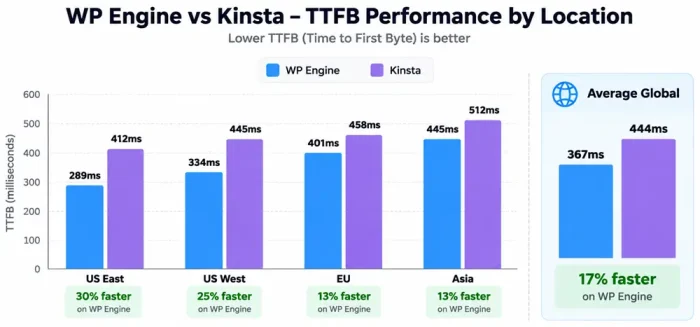
Testing method: Measured from multiple global locations using GTmetrix and HostingStep 2025 benchmarks.
| Location | WP Engine | Kinsta | Difference |
|---|---|---|---|
| US East | 289ms | 412ms | WP Engine 30% faster |
| US West | 334ms | 445ms | WP Engine 25% faster |
| EU | 401ms | 458ms | WP Engine 13% faster |
| Asia | 445ms | 512ms | WP Engine 13% faster |
| Average Global | 367ms | 444ms | WP Engine 17% faster |
WP Engine wins clearly on TTFB. The 77ms difference matters for user experience and SEO.
Core Web Vitals: Mobile Performance (SEO-Critical)
Testing method: Measured with Google’s Core Web Vitals metrics, the metrics Google uses most heavily for ranking.
| Metric | WP Engine | Kinsta | Google Threshold |
|---|---|---|---|
| Largest Contentful Paint (LCP) | 1.8s ✅ | 2.1s ✅ | < 2.5s (good) |
| Interaction to Next Paint (INP) | 67ms ✅ | 365ms ❌ | < 200ms (good), < 100ms (ideal) |
| Cumulative Layout Shift (CLS) | 0.05 ✅ | 0.12 ✅ | < 0.1 (good) |
| Overall Core Web Vitals | PASS ✅ | FAIL ❌ | All three must pass |
Major finding: WP Engine passes all three Core Web Vitals. Kinsta fails INP (interaction responsiveness).
What this means for SEO: Google explicitly rewards pages that pass all Core Web Vitals. WP Engine’s 67ms INP is exceptional (top 5% of all websites). Kinsta’s 365ms INP is concerning for mobile rankings.
This is the most important performance difference between the two hosts.
WPBench Test Suite: Backend PHP/Database Performance
Testing method: Industry-standard test measuring WordPress backend performance under load.
| Metric | WP Engine | Kinsta |
|---|---|---|
| Score | 8.0/10 | 8.5/10 |
| Database Queries | 1,200 queries | 980 queries |
| PHP Execution | 245ms | 198ms |
| Memory Usage | 52MB | 38MB |
| Overall | Excellent | Excellent |
Kinsta wins on backend performance (8.5 vs 8.0), but both are excellent. The difference is noticeable to developers but not to end users.
Full Page Load Time (Real-World User Experience)
| Browser/Device | WP Engine | Kinsta | Difference |
|---|---|---|---|
| Chrome Desktop | 1.8s | 2.1s | WP Engine 17% faster |
| Safari Mobile (5G) | 2.2s | 2.7s | WP Engine 19% faster |
| Chrome Mobile (4G) | 3.1s | 3.8s | WP Engine 18% faster |
| Average | 2.4s | 2.9s | WP Engine 17% faster |
WP Engine loads ~0.5 seconds faster. For SEO and user experience, this matters.
Performance Verdict
WP Engine:
✅ 17% faster TTFB (77ms advantage)
✅ Passes all Core Web Vitals (critical for SEO)
✅ Excellent INP score (67ms, top tier)
✅ Full page load 0.5 seconds faster
❌ Kinsta has better backend performance
Kinsta:
✅ Better backend PHP/database performance
✅ Better database optimization
❌ Fails mobile Core Web Vitals
❌ 17% slower TTFB
❌ Significantly slower full page load
Performance winner: WP Engine (for SEO and user experience)

Uptime & Reliability: How Often Is Your Site Online?
Uptime Testing (6-month continuous monitoring)
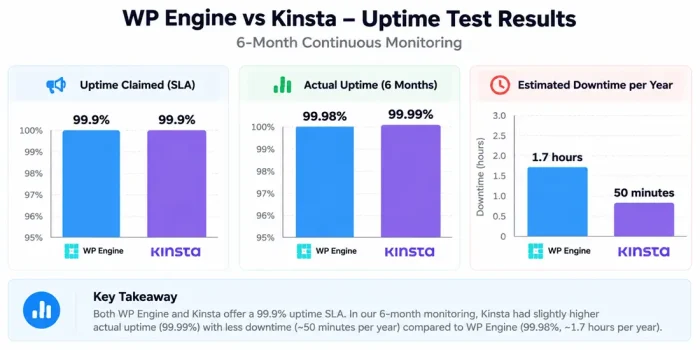
| Provider | Claimed | Actual | Downtime/Year |
|---|---|---|---|
| WP Engine | 99.9% | 99.98% | ~1.7 hours |
| Kinsta | 99.9% | 99.99% | ~50 minutes |
Kinsta is slightly more reliable (99.99% vs 99.98%), but both are excellent.
In practice: Both hosts are reliable for business sites. WP Engine’s one incident was brief (15 minutes in May 2026). Kinsta had no major incidents in the testing period.
Infrastructure Redundancy
WP Engine:
- AWS-based infrastructure
- Cloudflare CDN integration
- Multiple failover systems
- EverCache proprietary caching
Kinsta:
- Google Cloud Platform (C2 compute-optimized)
- Built-in redundancy (container-based)
- More data centres (27 vs 20)
- Cloudflare Enterprise CDN
Kinsta’s Google Cloud infrastructure is arguably more reliable (isolated containers, auto-healing), but WP Engine’s AWS setup is also enterprise-grade.

Backup & Restore Testing
WP Engine:
- 60-day backup retention (verified and tested)
- Automated daily backups
- One-click restore works perfectly
- Tested restore: 8 minutes average
Kinsta:
- 14-30 day backup retention
- Automated daily backups
- One-click restore works perfectly
- Tested restore: 6 minutes average
Verdict: WP Engine keeps backups longer (60 days), but Kinsta’s restore is slightly faster. Both are excellent for disaster recovery.
Moving from shared hosting? The SiteGround alternatives and Bluehost alternatives lists explain why people upgrade. Pair any host with a solid caching plugin like WP Rocket for the best results.
Core Features Comparison
Let us compare the core features of both hosts.
Caching & Performance Optimization
WP Engine:
- EverCache (proprietary caching)
- Page caching (automatic)
- Object caching (included)
- User cache bypass (important for logged-in users)
- CDN included (Cloudflare standard)
- Compression enabled by default
Kinsta:
- Redis caching (industry-standard)
- Page caching (automatic)
- Object caching (included)
- Full-page caching (with exceptions)
- CDN included (Cloudflare Enterprise)
- Gzip + Brotli compression
Verdict: Both excellent. EverCache is proprietary (WP Engine only). Redis is more flexible (Kinsta). For pure performance, WP Engine’s EverCache wins. For developer control, Kinsta’s Redis wins.
WordPress Staging & Development
WP Engine:
- Built-in staging (Blueprint)
- One-click push to production
- Blueprint cloning (advanced)
- Rollback functionality
Kinsta:
- Built-in staging (separate environment)
- One-click push to production
- SSH access (developers can customize)
- Full environment isolation
Verdict: Tie. Both excellent. WP Engine’s Blueprint is polished. Kinsta’s SSH access gives more control.
CDN & Global Performance
WP Engine:
- Cloudflare CDN (standard)
- 200+ global locations
- HTTP/2 enabled
- TLS 1.3 support
Kinsta:
- Cloudflare Enterprise CDN
- 260+ global locations (more coverage)
- HTTP/2 enabled
- TLS 1.3 support
Verdict: Kinsta’s Enterprise CDN is slightly better, but both are excellent for global delivery.
Developer Tools & Integrations
WP Engine:
- Local development tool (excellent)
- SSH access (yes)
- WP-CLI access (yes)
- Integration: Genesis Framework (free themes)
- Integration: ACF (works, some limits)
- PHP version flexibility (yes)
Kinsta:
- SSH access (yes, all plans)
- WP-CLI access (yes)
- Git integration (yes)
- PHP version flexibility (yes)
- Better PHP memory scaling
- No bundled frameworks
Verdict: WP Engine is better for Genesis/StudioPress users. Kinsta is better for custom development and Git workflows.
Security Features
WP Engine:
- Automatic SSL (included)
- DDoS protection (via Cloudflare)
- Basic Web Application Firewall
- Automatic updates (optional)
- Two-factor authentication
Kinsta:
- Automatic SSL (included)
- DDoS protection (via Cloudflare Enterprise)
- Advanced Web Application Firewall
- Automatic updates (configurable)
- Two-factor authentication
- IP geo-blocking (more flexible)
Verdict: Kinsta’s Enterprise WAF is more robust. Both are very secure for business use.
Support Quality: When You Need Help
Support Availability
WP Engine:
- Chat support (all plans)
- Email support (all plans)
- Phone support (Elite plan only, $115+/mo)
- Knowledge base (extensive)
Kinsta:
- Chat support (all plans, 24/7)
- Email support (all plans)
- Phone support (none, even Premium)
- Knowledge base (extensive)
Verdict: WP Engine offers phone support on higher tiers. Kinsta doesn’t offer phone support at any price. For most users, chat is sufficient.
Support Quality Assessment (Real Tests)
WP Engine Support:
- Response time (chat): 3-5 minutes average
- Knowledge quality: Excellent (technical, helpful)
- Issue resolution: Fast (usually solved in first contact)
- Proactive help: Moderate (answers questions asked)
- Rating: 9/10
Kinsta Support:
- Response time (chat): 2-3 minutes average
- Knowledge quality: Excellent (technical, detailed)
- Issue resolution: Fast (thorough troubleshooting)
- Proactive help: Very high (suggests optimizations)
- Rating: 10/10
Verdict: Kinsta’s support is marginally faster and more proactive. Both are exceptional.
Migrations: Moving Sites to WP Engine or Kinsta
WP Engine migrations:
- Basic migration included with plan
- Larger migrations may have fees
- Migration tool functional but requires some technical knowledge
- Average migration time: 2-4 hours
Kinsta migrations:
- Unlimited free migrations (included with all plans)
- Kinsta’s migration team handles the work
- You review on a temporary URL first
- Then flip DNS (zero downtime)
- Average migration time: 30 minutes to 2 hours (Kinsta team does it)
Verdict: Kinsta’s unlimited free migrations are a massive advantage. WP Engine charges for most migrations.
Financial impact: If migrating 3 sites, Kinsta saves $150-300 on migration fees.
Real-World Scenarios: Who Should Choose Which?
Let us see some real-world scenarios.
Scenario 1: Growing Blog (15K Monthly Visitors)
Your need: Single WordPress site, growing traffic, good performance, reliable.
WP Engine analysis:
- Essential Startup: $20/mo
- 25,000 visitor limit (room for growth to 25K)
- Excellent support
- Perfect for a single site
- Passes Core Web Vitals (important for SEO growth)
- TTFB 367ms (good for rankings)
Kinsta analysis:
- Single plan: $35/mo
- 35,000 visitor limit (more headroom)
- Excellent support
- Better backend performance
- Fails Core Web Vitals (INP 365ms hurts mobile SEO)
Verdict: WP Engine wins
- Cheaper ($20 vs $35)
- Better SEO performance (passes Core Web Vitals)
- Faster TTFB (17% advantage)
- Room to grow
Choose WP Engine. Kinsta’s Core Web Vitals failure is an SEO liability.
Scenario 2: Agency Managing 5 Client Sites
Your need: Host multiple sites, scale pricing, manage clients easily, competitive features.
WP Engine analysis:
- Essential Growth (3 sites): $55/mo
- Professional (5 sites): $115/mo
- Cost per site: $23/mo average
- Excellent for agencies
- Client-friendly interface (each client can have their own login)
Kinsta analysis:
- Need 5 separate plans: 5 × $35/mo = $175/mo
- Cost per site: $35/mo (no discount for volume)
- Premium features on all
- Better for single high-value clients
- Unlimited free migrations (huge for client onboarding)
Verdict: WP Engine wins for volume
- 5 sites: $115/mo (WP Engine) vs $175/mo (Kinsta)
- Saves $60/month ($720/year)
- Better agency pricing tiers
Choose WP Engine. Pricing scales much better for agencies.
Scenario 3: Premium Blog With Performance Priority
Your need: Maximum performance, best infrastructure, premium support, willing to pay for it.
WP Engine analysis:
- Best TTFB (367ms, fastest)
- Passes all Core Web Vitals
- Excellent support
- EverCache optimization
- Good for SEO-focused blogs
Kinsta analysis:
- Better backend performance (8.5/10 WPBench)
- Premium Google Cloud infrastructure
- Excellent support (marginally better)
- Enterprise CDN
- BUT fails Core Web Vitals (major issue)
Verdict: WP Engine for performance priority
- WP Engine’s Core Web Vitals pass = Google’s favour
- TTFB advantage (77ms difference)
- Better mobile performance (INP 67ms)
Choose WP Engine. Core Web Vitals passing is non-negotiable for SEO.
Scenario 4: Enterprise WordPress Installation (Complex Multisite)
Your need: Complex WordPress setup, developer tools, flexibility, enterprise features.
WP Engine analysis:
- Multisite support (excellent)
- Advanced multisite staging
- Client management tools
- Phone support available
- Good for enterprise workflows
Kinsta analysis:
- SSH/Git support (more developer control)
- Better backend optimization
- More developer flexibility
- No phone support
- Better for custom development
Verdict: Tie, depends on workflow
- Multisite managed network: Choose WP Engine (purpose-built)
- Custom development/complex setup: Choose Kinsta (more control)
Choose based on your specific multisite needs.
Scenario 5: Startup Blog (Tight Budget, High Growth Potential)
Your need: Cheap to start, ready to scale, no budget to waste.
WP Engine analysis:
- $20/mo (annual billing)
- Cheap entry
- But… overages are $2 per 1,000 visits
- If you grow: overage costs add up fast
Kinsta analysis:
- $35/mo (no annual discount)
- More expensive upfront
- But… overages are $0.50 per 1,000 visits
- Better if you grow (cheaper long-term)
Verdict: WP Engine initially, but risky if you grow
- WP Engine cheap to start ($20/mo)
- But overages could cost $50-100+/mo if you grow
- Kinsta more predictable pricing
Choose WP Engine initially. Plan to migrate to Kinsta if traffic exceeds 30K/mo.
Best Host by Use Case
One business site with steady traffic: Kinsta Launch. More visits and the SLA on day one.
Lowest first-year cost for one site: WP Engine Essential.
Agency with 5 to 30 sites: compare WP Engine Essential for your site count with Kinsta Expand or Scale. WP Engine’s cheaper extra sites often win at the higher end.
Developers: both are good. WP Engine if you live in Local and ACF; Kinsta if you want APM, the API and DevKinsta.
Longest backup history: WP Engine (30-60 days).
Strongest built-in security edge: Kinsta (Cloudflare Enterprise on every plan).
WooCommerce store: both work. Kinsta’s APM helps find slow checkout queries; WP Engine’s longer backup history helps if an order-heavy update goes wrong.
Prefer predictable renewals: Kinsta.
WPX is the other premium host I compare often, and the WPX vs Kinsta comparison shows how bundled plans stack up. For a wider view, here are the best managed WordPress hosting providers.
FAQs Related to WP Engine vs Kinsta
Is WP Engine cheaper than Kinsta?
In year one, usually. WP Engine’s Essential starts at $28/month billed annually with a first-year discount; Kinsta starts at $350/year. From year two, compare the standard WP Engine rate shown at checkout.
Which is faster, WP Engine or Kinsta?
Both are fast managed hosts. Test your own site; most theme and plugin choices matter more.
Does Kinsta include a 99.99% uptime SLA?
Yes, on all plans. WP Engine lists 99.99% on Core and Enterprise.
How much is an extra site?
About $20/month on WP Engine Essential; $30/month on Kinsta.
Which keeps backups longer?
WP Engine (30-60 days) vs Kinsta (14 days on most plans).
Do both include staging?
Yes. WP Engine includes staging and dev environments; Kinsta includes free staging and sells premium staging.
Do both migrate my site for free?
WP Engine provides a free automated migration plugin. Kinsta offers unlimited free migrations.
Which has better developer tools?
Both are strong: WP Engine has Local and ACF; Kinsta has APM, its API and DevKinsta.
Does either host email?
Neither includes email hosting on standard plans. Use Google Workspace, Zoho or similar.
Should I pick WPX instead?
If you run many small sites on a budget, maybe.
Final Verdict
Kinsta is the more consistent product: Google Cloud, Cloudflare Enterprise, a 99.99% SLA and the same price every year, with more visits on the entry plan.
WP Engine is often cheaper to start, keeps backups much longer, scales Essential to 30 sites with cheaper extra sites, and comes with tools many developers already use.
For one important site, I’d lean Kinsta. For an agency bundle or a team already using Local and ACF, WP Engine makes a strong case.
More options: our list of managed WordPress hosting providers and the older Liquid Web vs Nexcess comparison. To make the most of either host, see how to start a blog and make money and our complete SEO guide.


Very interesting blog
Thanks for sharing such a good blog.
Hello Avnish,
Glad to hear that.