GeneratePress vs Astra looks like a coin toss on paper. Both are fast. Both have generous free versions. Both work with the block editor and with page builders.
They aren’t the same, though. GeneratePress keeps the theme tiny and expects you to design with blocks. Astra hands you more settings, more starter templates and more WooCommerce options out of the box.
That difference shows up in three places people forget to check: what you pay after the first year, how much each theme adds to your page weight, and how much time you’ll spend customising. I’ll walk through each, then tell you which theme I’d pick for a blog, a store and a client site.
- GeneratePress vs Astra: Which Lightweight Theme Should You Use?
- Pricing: First Year vs Real Cost
- Performance: GeneratePress vs Astra Speed
- Design and Customization
- WooCommerce
- Starter Templates
- Support and Updates
- Pros and Cons
- Which Theme Should You Pick?
- FAQs Related to GeneratePress vs Astra
- Final Verdict: GeneratePress or Astra?
Quick Answer: GeneratePress is the leaner, cheaper choice over time. It was faster in our test (1.1s vs 1.7s), and GP Premium costs $59 every year. Astra is the friendlier choice for beginners and stores, with a much bigger template library and more WooCommerce features. Astra Pro costs $99 the first year, then $149/year for 3 sites, or $279 once for a lifetime license.
Pick GeneratePress for blogs, affiliate sites and anyone building with blocks. Pick Astra for WooCommerce stores, Elementor users and beginners who want a ready-made design.
GeneratePress vs Astra: Which Lightweight Theme Should You Use?
GeneratePress vs Astra at a Glance
| GeneratePress | Astra | |
|---|---|---|
| Free version | Yes (WordPress.org) | Yes (WordPress.org) |
| Active installs | 500,000+ | 1 million+ |
| WordPress.org rating | 4.9/5 (1,400+ reviews) | 4.9/5 (6,500+ reviews) |
| Page weight | Under 10 KB gzipped on a fresh install (developer claim) | Lightweight, no jQuery |
| Our speed test | 1.1s, 94 PageSpeed (mobile) | 1.7s, 87 PageSpeed (mobile) |
| Paid version | GP Premium $59/year; GP One $149/year | Astra Pro $99 first year, $149/year renewal |
| Lifetime option | Not listed | Yes, $279 (Astra Pro, 3 sites) |
| Sites on paid plan | Up to 500 | 3 (Astra Pro) |
| Starter sites | 60+ (Premium), 80+ (GP One) | Large library, free and premium |
| Design approach | Blocks via GenerateBlocks | Customizer + any page builder |
| WooCommerce depth | Good (Premium) | Strong (Pro) |
| Refund window | 30 days | 14 days |
How We Compared Them
We built the same homepage (hero, three-column features row, testimonials, blog grid, footer) on both themes, on the same hosting, with caching turned off. We ran the same test on Kadence and Divi for our other theme reviews, so all the numbers line up.
Pricing, renewals and site limits come from each theme’s pricing page. Install counts and ratings come from WordPress.org. Feature details come from each theme’s docs.
GeneratePress in a Nutshell
GeneratePress is a minimal theme made by Tom Usborne. The free version gives you a clean, accessible base with layout, typography and colour controls in the Customizer.
Its main selling point is weight. The developer says a fresh install adds less than 10 KB gzipped to your page.
GP Premium ($59/year) adds modules you switch on as needed:
- Elements for hooks, custom headers, layouts and block-based templates
- More typography and colour controls
- Blog layouts (masonry, columns, infinite scroll)
- WooCommerce controls
- Menu Plus for sticky and off-canvas menus
- Site Library with 60+ starter sites
GP One ($149/year) bundles GP Premium with GenerateBlocks Pro (300+ patterns and advanced block styling) and GenerateCloud (pattern libraries you can reuse across sites).
Every paid plan covers up to 500 sites, which is great value for agencies.
Our full GeneratePress review covers it in more detail.
Astra in a Nutshell
Astra is made by Brainstorm Force and runs on more than a million sites. The free theme already includes a header and footer builder, global colours and fonts, and WooCommerce styling.
That’s more than most free themes give you.
Astra Pro adds:
- Advanced headers, mega menus, and sticky and transparent headers
- A site builder with display conditions
- More blog layouts
- A deep WooCommerce module: quick view, slide-out filters, sticky add-to-cart, a modern cart and a two-step checkout
Its Starter Templates library is one of the biggest around, with designs for both the block editor and Elementor.
Our full Astra theme review goes deeper.
Pricing: First Year vs Real Cost
This is where the two themes split the most.
| GeneratePress | Astra | |
|---|---|---|
| Entry paid plan | GP Premium: $59/year | Astra Pro + AI: $99 first year |
| Entry plan renewal | $59/year | $149/year |
| Sites on entry plan | Up to 500 | 3 |
| Bundle | GP One: $149/year (GP Premium + GenerateBlocks Pro + GenerateCloud) | Essential Toolkit: $199 first year, $299 renewal (10 sites) |
| Agency | GP One: up to 500 sites | Business Toolkit: $279 first year, $429 renewal (1,000 sites) |
| Lifetime | Not listed | Astra Pro $279; Essential $549; Business $799 |
| Refund | 30 days | 14 days |
Prices verified from generatepress.com and wpastra.com.
What You’ll Pay Over 3 Years
| Plan | Year 1 | Year 2 | Year 3 | Total |
|---|---|---|---|---|
| GP Premium | $59 | $59 | $59 | $177 |
| GP One | $149 | $149 | $149 | $447 |
| Astra Pro (yearly) | $99 | $149 | $149 | $397 |
| Astra Pro (lifetime) | $279 | $0 | $0 | $279 |
GP Premium is the cheapest paid option by a wide margin, and it covers far more sites. If you go with Astra and plan to keep it for three years or more, the lifetime plan works out cheaper than paying yearly.
Both themes usually run Black Friday sales. Check our GeneratePress Black Friday discount and Astra Black Friday discount pages before you buy.
Performance: GeneratePress vs Astra Speed
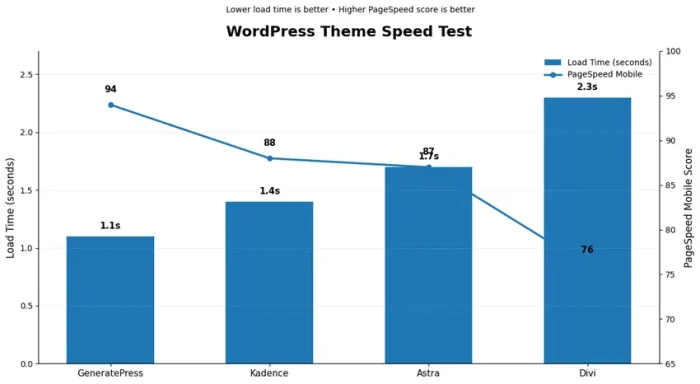
Here’s how both did in our homepage test, alongside the other themes we tested:
| Theme | Load Time | PageSpeed (Mobile) |
|---|---|---|
| GeneratePress | 1.1s | 94 |
| Kadence | 1.4s | 88 |
| Astra | 1.7s | 87 |
| Divi | 2.3s | 76 |
GeneratePress won by 0.6 seconds. Astra still did well, though. It scored close to Kadence on PageSpeed and was well ahead of Divi.
The two themes approach speed a little differently:
- GeneratePress publishes a page-weight figure (under 10 KB gzipped), and Premium modules only load when you turn them on.
- Astra uses plain JavaScript instead of jQuery and loads CSS based on your settings. You can also switch off Pro modules one by one.
In real life, the theme is rarely what makes a WordPress site slow. Page builders, sliders, ad scripts and heavy images matter much more.
GeneratePress with GenerateBlocks is one of the lightest setups you can build. Astra with Elementor is heavier because Elementor adds its own CSS and JavaScript.
Astra with the block editor (or Spectra) gets much closer to GeneratePress.
Whichever you pick, add a caching plugin and decent hosting. Our WP Rocket vs FlyingPress comparison and our list of the fastest web hosting providers will help.
For more, see our fastest WordPress themes list and our tips to speed up your WordPress site.
Design and Customization
GeneratePress expects you to design with blocks. Using GenerateBlocks Pro and Elements, you can build headers, archive pages and single post templates without a page builder.
It takes some getting used to, but the result is clean, light code.
For affiliate sites, Elements is a real time saver. You can drop a disclosure box or comparison table into every post in a category at once, without editing posts one by one.
It pairs well with the tools in our best affiliate link cloaking plugins roundup.
Astra puts more in the Customizer: a header and footer builder, mega menus, sticky and transparent headers, and lots of layout toggles. It also works smoothly with Elementor, Beaver Builder and the Divi Builder if you’d rather design visually.
In short: GeneratePress gives you better building tools, and Astra gives you more finished settings.
WooCommerce
Astra wins this one.
Astra Pro’s WooCommerce module covers shop layouts, quick view, slide-out filters, infinite scroll, sticky add-to-cart, variation swatches, a modern cart and a two-step, distraction-free checkout.
That’s a lot of store features without extra plugins.
GP Premium’s WooCommerce module handles layout, columns, sticky add-to-cart and a few related settings. It’s fine for a small store, but you’ll reach for plugins sooner once you need more.
For any store, hosting matters as much as the theme. See our list of the best WooCommerce hosting providers and our guide on how to build an online store.
Starter Templates
Astra’s Starter Templates library is much bigger and includes an AI site builder. GeneratePress has 60+ starter sites in GP Premium and 80+ in GP One.
If you want to import a finished design and swap in your own text and images, Astra is easier.
If you’d rather start from a clean base and build your own look, GeneratePress gives you less to undo.
Support and Updates
GeneratePress support runs through its forum, and the developer and his team answer most threads themselves. GP One adds priority email support.
Astra offers ticket support for Pro users, with VIP support on the Business Toolkit. Both themes get regular updates and have long track records of stability.
Pros and Cons
GeneratePress
What We Like
- Very light base (under 10 KB gzipped, per the developer)
- Faster in our test (1.1s, 94 PageSpeed)
- GP Premium is $59/year with no renewal jump
- Every paid plan covers up to 500 sites
- Clean code and strong accessibility
- 30-day refund
What We Don’t Like
- Smaller starter template library
- Designing with blocks has a learning curve
- No lifetime plan
- Fewer built-in WooCommerce extras
Astra
What We Like
- Huge starter template library with an AI site builder
- Deep WooCommerce features in Pro
- Works well with every major page builder
- Lifetime plans available
- Very large user community
What We Don’t Like
- Renewal jumps from $99 to $149
- Astra Pro covers only 3 sites
- The dashboard promotes other Brainstorm Force products
- 14-day refund window (half of GeneratePress’s)
Which Theme Should You Pick?
| Your Site | Best Pick | Runner-Up |
|---|---|---|
| Blog or affiliate site | GeneratePress | Astra (free) |
| WooCommerce store | Astra Pro | GP Premium + WooCommerce plugins |
| You build with Elementor | Astra | GeneratePress (also works with Elementor) |
| You build with the block editor | GeneratePress + GenerateBlocks | Astra + Spectra |
| Beginner who wants a template | Astra | Kadence |
| Agency with many client sites | GP One (500 sites) | Astra Business Toolkit (1,000 sites, costs more) |
| Lowest long-term cost | GP Premium ($59/year) | Astra Pro lifetime |
| Course or membership site | Astra (LearnDash and LifterLMS support) | GeneratePress |
If you’re building a course site, our LearnDash Cloud review covers a hosted option that pairs well with either theme.
Not set on these two? Kadence sits in between, with more design tools than GeneratePress and a faster result than Astra in our test.
Our guide on how to choose a WordPress theme walks through the whole decision.
FAQs Related to GeneratePress vs Astra
Is GeneratePress faster than Astra?
Yes, in our test, GeneratePress loaded in 1.1s vs 1.7s for Astra. On real sites, the gap is usually small unless you add a page builder like Elementor to Astra.
Is GeneratePress free?
Yes. The theme is free on WordPress.org. GP Premium ($59/year) and GP One ($149/year) are optional paid add-ons.
Is Astra free?
Yes. Astra Pro is a paid add-on, starting at $99 for the first year.
Which is cheaper, GeneratePress or Astra?
GeneratePress. GP Premium is $59/year for up to 500 sites. Astra Pro renews at $149/year for 3 sites.
Does Astra have a lifetime deal?
Yes. Astra Pro lifetime is $279 for 3 sites. GeneratePress doesn’t list a lifetime plan.
Which is better for WooCommerce?
Astra Pro. It has more store features built in, like quick view, filters and a two-step checkout.
Which is better for SEO?
Both output clean, fast HTML and work with every SEO plugin. Your content and keywords matter much more than the theme. Our guide on how to find profitable keywords is a good next step.
Can I switch from Astra to GeneratePress?
Yes. Your posts and pages stay. You’ll need to rebuild your header, footer and any theme-specific layouts.
Do I need a page builder with either theme?
No. Both work fully with the WordPress block editor.
Which is better for beginners?
Astra, because of its big template library and the extra settings in the Customizer.
Final Verdict: GeneratePress or Astra?
Our Pick for Most Bloggers: GeneratePress
Our Pick for Stores and Beginners: Astra
For most bloggers and affiliate marketers, GeneratePress is the better fit. It’s lighter, it was faster in our test, it costs less every year, and it’s built for the block editor.
For WooCommerce stores, Elementor users and beginners who want a finished design, Astra gives you more out of the box, and its lifetime plan is a good deal if you’ll keep it for years.
Either way, the theme is only one piece. Good hosting, caching and content do most of the work. Our guide on how to start a blog and make money covers the rest of the setup.